

Understanding Threads, Traces and Runs
LangSmith has three levels that work together to capture your agent’s behavior:Threads
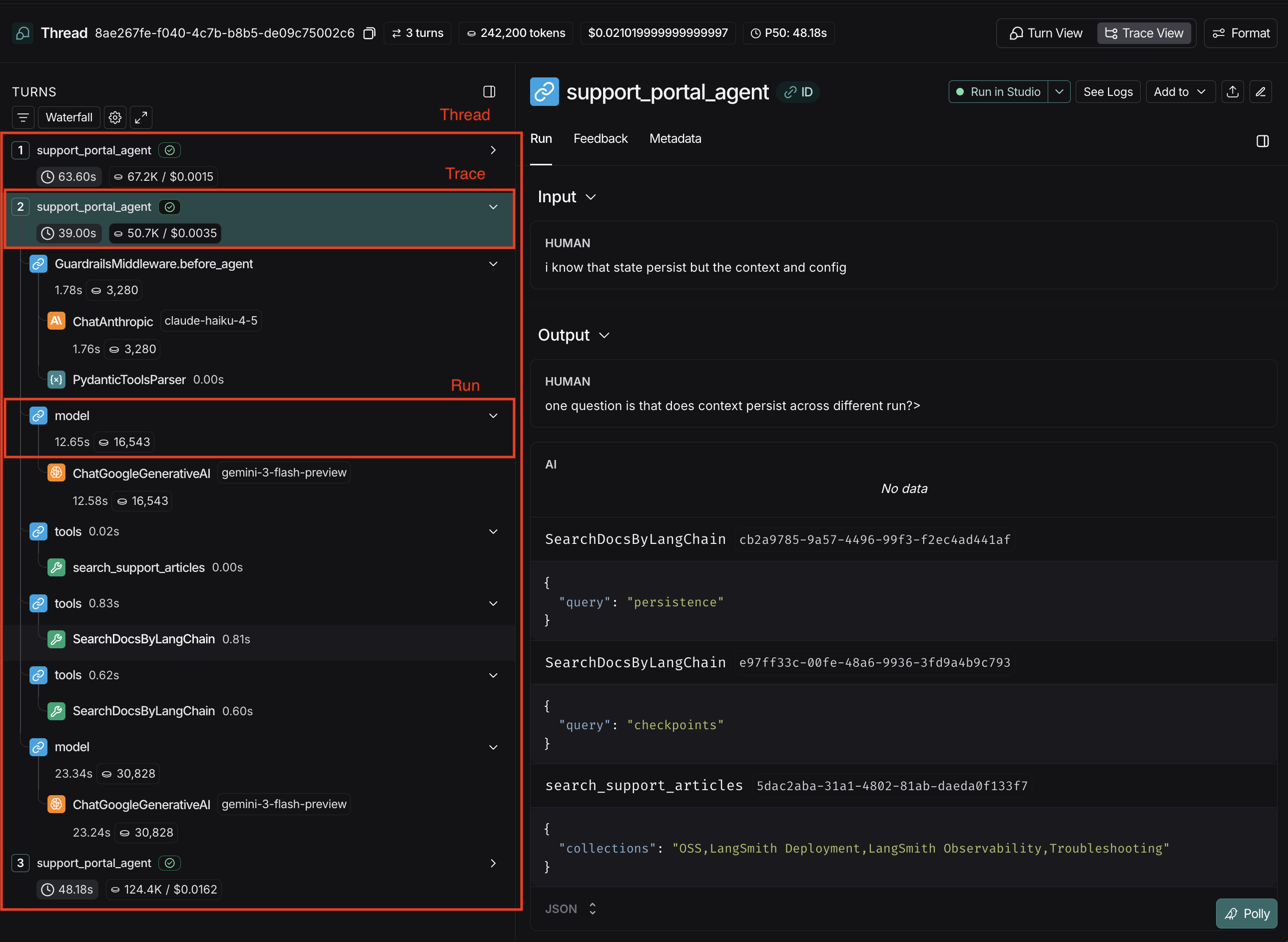
A Thread groups multiple interactions together so you can see the history over time. In the LangSmith UI, threads can be viewed in the “Threads” tab within a Tracing Project.Traces
A Trace represents a single request/response cycle, also known as a “turn”. It contains everything that happened during one execution of an agent. Multiple traces, grouped together, form a thread. In the LangSmith UI, a trace is the “parent” node in the execution tree.Runs
A Run is an individual operation within a trace: an LLM call, a tool execution, middleware, or any other step in your agent’s process. One or more runs make up a trace. In the LangSmith UI, runs are “children” and “grandchildren” (and onward as needed) nodes in the tree. If a trace fails, you would examine individual runs to identify which step had an error.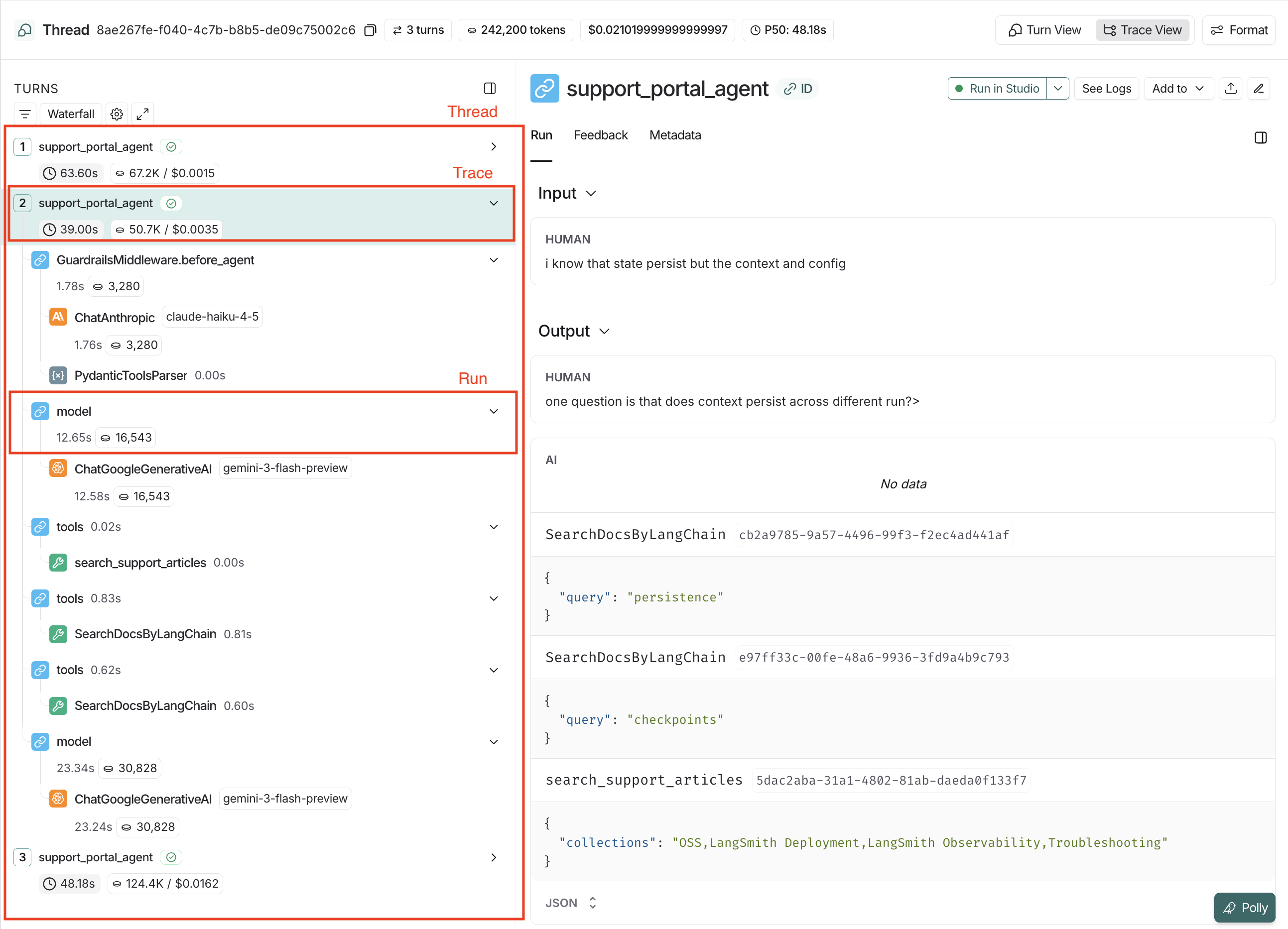
Trace Structure
Structure your traces so each one is self-contained and replayable:- Input: The new message or instruction. For example: What’s the status of the Tokyo shipment?
- Output: Output is the state of the interaction after the turn. Represents the current memory (interaction history + new messages) of the agent after the turn is complete. For example: What’s the status of the Tokyo shipment? -> Checked the shipping logs -> Found the Tokyo tracking number -> Confirmed it arrived at port -> Told the user.
messages as a top-level key that represents the interaction.
Input:
Message Format Standards
In the above section, we covered the expected structure of traces. This section covers the expected structure ofmessages within a trace.
Required Structure
Themessages key should be follow LangChain, OpenAI Chat Completions or Anthropic messages formats. If you’re using other models, or tracing a custom model, you’ll need to modify the structure of the messages array to follow one of the supported schemas for best results.
If you’re using LangChain OSS to call language models or LangSmith wrappers (OpenAI, Anthropic), this formatting is handled automatically.
Schema
Examples
FAQ
What if my model doesn't return the exact format?
What if my model doesn't return the exact format?
If you’re using a custom input or output format, you can convert it to a LangSmith compatible format using
process_inputs and process_outputs with the @traceable decorator to transform your custom format into LangSmith-compatible structure:For details, refer to the Log LLM calls page.How do I handle streaming responses?
How do I handle streaming responses?
Log the final accumulated result after streaming completes:Don’t log individual chunks—log the complete message once streaming finishes.
How do I trace parallel tool calls?
How do I trace parallel tool calls?
Include all tool calls and their results in the message sequence:The
tool_call_id links each result to its corresponding call.What about local/private data in traces?
What about local/private data in traces?
Traces are stored according to retention policies, which can only be modified if you are on self-hosted LangSmith.
- Use references instead of raw data: Store files externally and use the
idfield - Filter before logging: LangSmith provides multiple approaches to protect your data before it’s sent to the backend here.
- Configure Trace Deletion: Set up trace deletion rules.