> ## Documentation Index
> Fetch the complete documentation index at: https://langchain-5e9cc07a-preview-messag-1768947382-18caaf8.mintlify.site/llms.txt
> Use this file to discover all available pages before exploring further.
# Tracing Standards
This page defines the tracing standards required to unlock important capabilities in LangSmith. Structuring your traces correctly is required to make the most of LangSmith:
**1. Rich debugging experience**: LangSmith provides structured rendering of message lists, making it easier to visualize and understand the interaction history.
**2. LangSmith features**: Features like [Polly](/langsmith/polly), [LangSmith Fetch](https://github.com/langchain-ai/langsmith-fetch) and [multi-turn evals](/langsmith/online-evaluations#configure-multi-turn-online-evaluators) require properly structured traces to work correctly.
## Understanding Threads, Traces and Runs
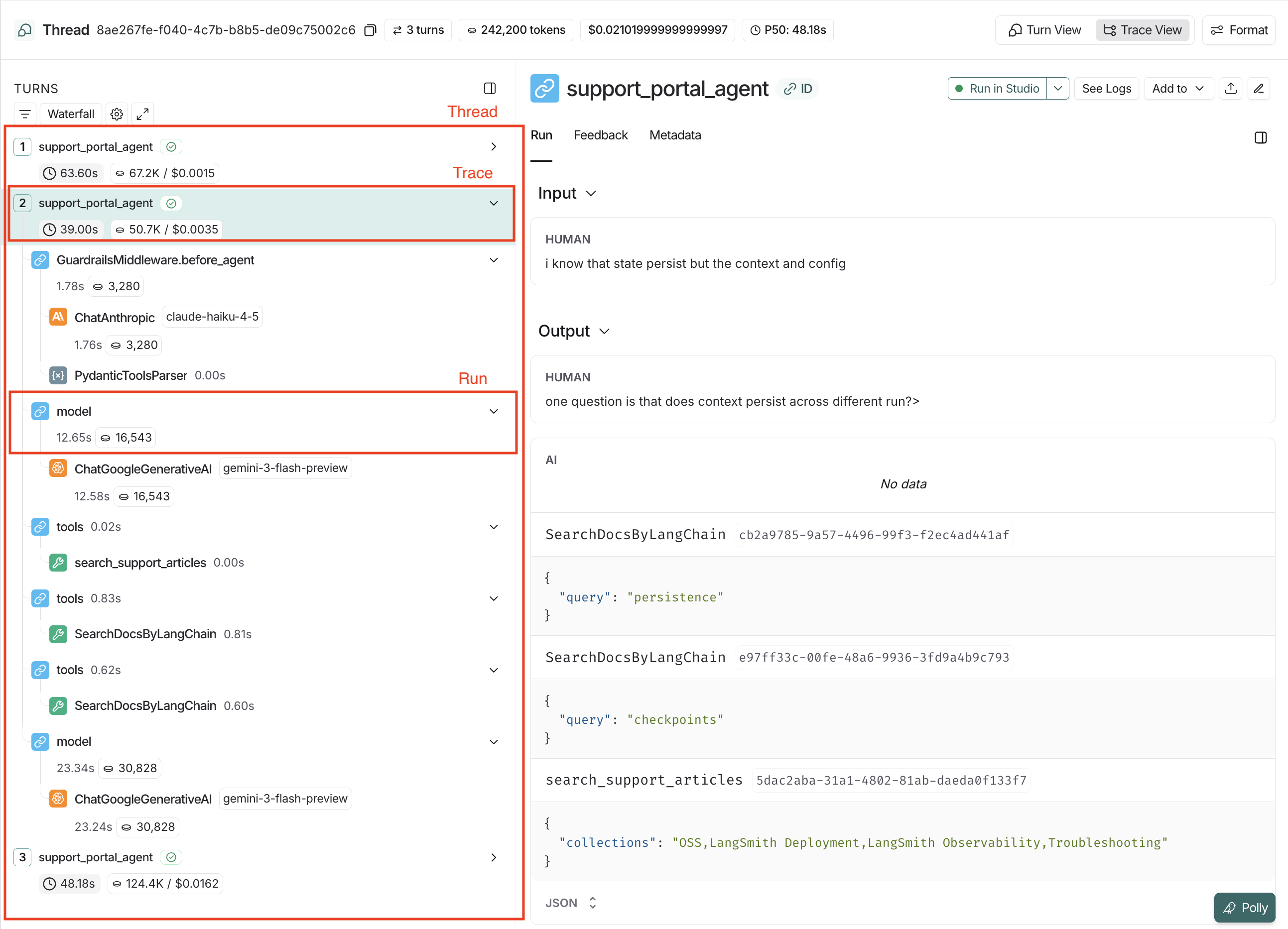
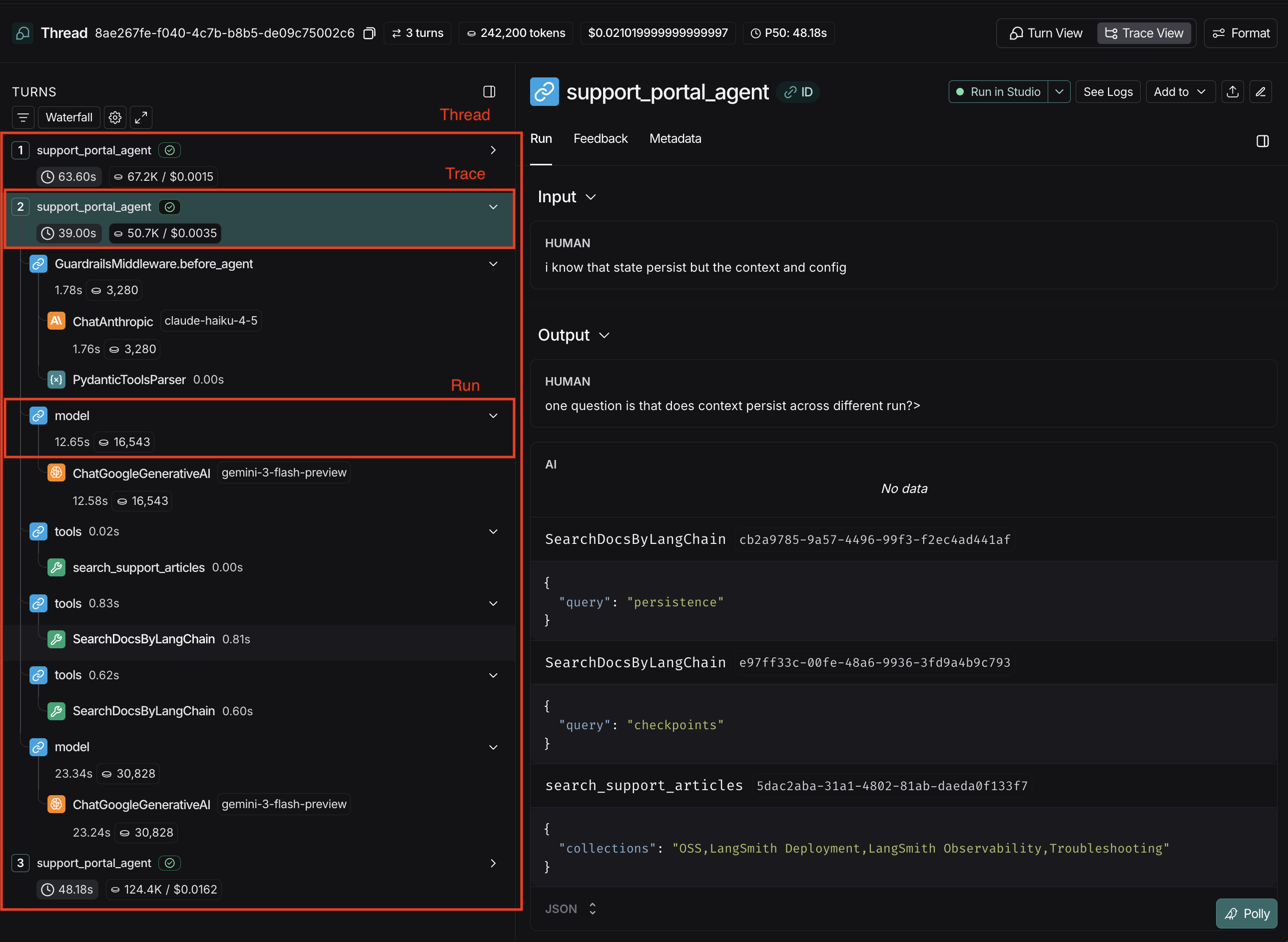
LangSmith has three levels that work together to capture your agent's behavior:
#### Threads
A [***Thread***](/langsmith/threads) groups multiple interactions together so you can see the history over time. In the LangSmith UI, threads can be viewed in the "Threads" tab within a Tracing Project.
#### Traces
A [***Trace***](/langsmith/observability-concepts#traces) represents a single request/response cycle, also known as a "turn". It contains everything that happened during one execution of an agent. Multiple traces, [grouped together](/langsmith/threads), form a thread. In the LangSmith UI, a trace is the "parent" node in the execution tree.
#### Runs
A [***Run***](/langsmith/observability-concepts#runs) is an individual operation within a trace: an LLM call, a tool execution, middleware, or any other step in your agent's process. One or more runs make up a trace. In the LangSmith UI, runs are "children" and "grandchildren" (and onward as needed) nodes in the tree. If a trace fails, you would examine individual runs to identify which step had an error.
### Trace Structure
Structure your traces so each one is self-contained and replayable:
* **Input:** The new message or instruction. For example: *What's the status of the Tokyo shipment?*
* **Output:** Output is the state of the interaction after the turn. Represents the current memory (interaction history + new messages) of the agent after the turn is complete. For example: *What’s the status of the Tokyo shipment? -> Checked the shipping logs -> Found the Tokyo tracking number -> Confirmed it arrived at port -> Told the user.*
The benefit of this approach is **any trace can be understood independently** without needing to search for prior context.
Both inputs and outputs of a trace must have `messages` as a top-level key that represents the interaction.
**Input:**
```json theme={null}
{
"messages": [
// User's current request
],
"additional_fields":{
// Optional additional fields
}
}
```
**Output:**
```json theme={null}
{
"messages": [
// History from prior turns + user request + LLM response
],
"additional_fields":{
// Optional additional fields
}
}
```
You can think of the output as the intraction state after the turn, which is why outputs should include the full message history—not just the latest response. The output is a complete "receipt" of what happened in that turn.
View [Threads](/langsmith/threads#example) for more information on how to configure threads, and the expected trace structure within a thread.
## Message Format Standards
In the above section, we covered the expected structure of traces. This section covers the expected structure of `messages` within a trace.
If you don’t log your LLM traces in the suggested formats, you will still be able to log the data to LangSmith, but it may not be processed or rendered in expected ways, and you will not be able to use some features, like [Polly](/langsmith/polly), [LangSmith Fetch](https://github.com/langchain-ai/langsmith-fetch) and [multi-turn evals](/langsmith/online-evaluations#configure-multi-turn-online-evaluators).
### Required Structure
The `messages` key should be follow LangChain, [OpenAI Chat Completions](https://platform.openai.com/docs/api-reference/chat/create) or [Anthropic](https://platform.claude.com/docs/en/api/messages) messages formats. If you're using other models, or tracing a [custom model](/langsmith/log-llm-trace#identifying-a-custom-model-in-traces), you'll need to [modify the structure of the `messages` array](/langsmith/log-llm-trace#converting-custom-i/o-formats-into-langsmith-compatible-formats) to follow one of the supported schemas for best results.
If you're using [LangChain OSS](https://docs.langchain.com/#:~:text=Open%20source%20agent%20frameworks) to call language models or LangSmith wrappers ([OpenAI](/langsmith/trace-openai), [Anthropic](/langsmith/trace-anthropic)), this formatting is handled automatically.
### Schema
A list of messages containing the content of the interaction.
Identifies the message type. One of: system | reasoning | user | assistant | tool
Content of the message. List of typed dictionaries.
One of: text | reasoning | image | file | audio | video | tool\_call | server\_tool\_call | server\_tool\_result
Text content.
List of annotations for the text.
Additional provider-specific data.
Reasoning content (e.g., extended thinking tokens).
Additional provider-specific data.
URL pointing to the image location.
Base64-encoded image data.
Reference ID to an externally stored image (e.g., in a provider's file system).
Image [MIME type](https://www.iana.org/assignments/media-types/media-types.xhtml#image) (e.g., `image/jpeg`, `image/png`).
URL pointing to the file.
Base64-encoded file data.
Reference ID to an externally stored file.
File [MIME type](https://www.iana.org/assignments/media-types/media-types.xhtml#image) (e.g., `application/pdf`).
URL pointing to the audio file.
Base64-encoded audio data.
Reference ID to an externally stored audio file.
Audio [MIME type](https://www.iana.org/assignments/media-types/media-types.xhtml#image) (e.g., `audio/mpeg`, `audio/wav`).
URL pointing to the video file.
Base64-encoded video data.
Reference ID to an externally stored video file.
Video [MIME type](https://www.iana.org/assignments/media-types/media-types.xhtml#image) (e.g., `video/mp4`, `video/webm`).
Name of the tool being called.
Arguments to pass to the tool.
Unique identifier for this tool call.
Unique identifier for this tool call.
The name of the tool to be called.
Arguments to pass to the tool.
Identifier of the corresponding server tool call.
Unique identifier for this tool result.
Execution status of the server-side tool. One of: success | error.
Output of the executed tool.
Must match the id of a prior assistant message's tool call entry. Only valid when role is tool.
Use this field to send token counts and/or costs with your model's output. See [this guide](/langsmith/log-llm-trace#provide-token-and-cost-information) for more details.
### Examples
```python Text & Reasoning theme={null}
inputs = {
"messages": [
{
"role": "user",
"content": [
{
"type": "text",
"text": "What's the capital of France?"
}
]
}
]
}
outputs = {
"messages": [
{
"role": "assistant",
"content": [
{
"type": "text",
"text": "The capital of France is Paris."
},
{
"type": "reasoning",
"text": "This is a straightforward geography question..."
}
]
}
]
}
```
```python Tool Calls theme={null}
inputs = {
"messages": [
{
"role": "user",
"content": [
{
"type": "text",
"text": "What's the weather in San Francisco?"
}
]
}
]
}
outputs = {
"messages": [
{
"role": "assistant",
"content": [
{
"type": "tool_call",
"name": "get_weather",
"args": {"city": "San Francisco"},
"id": "call_1"
}
]
},
{
"role": "tool",
"tool_call_id": "call_1",
"content": [
{
"type": "text",
"text": '{"temperature": "18°C", "condition": "Sunny"}'
}
]
},
{
"role": "assistant",
"content": [
{
"type": "text",
"text": "The weather in San Francisco is 18°C and sunny."
}
]
}
]
}
```
```python Multimodal theme={null}
inputs = {
"messages": [
{
"role": "user",
"content": [
{
"type": "text",
"text": "What breed is this dog?"
},
{
"type": "image",
"url": "https://example.com/dog.jpg",
# Alternative: use base64 encoding
# "base64": "",
"mime_type": "image/jpeg"
}
]
}
]
}
outputs = {
"messages": [
{
"role": "assistant",
"content": [
{
"type": "text",
"text": "This looks like a Black Labrador."
}
]
}
]
}
```
```python Server-Side Tools theme={null}
inputs = {
"messages": [
{
"role": "user",
"content": [
{
"type": "text",
"text": "What is the price of AAPL?"
}
]
}
]
}
outputs = {
"messages": [
{
"role": "assistant",
"content": [
{
"type": "server_tool_call",
"name": "web_search",
"args": {
"query": "price of AAPL",
"type": "search"
},
"id": "call_1"
},
{
"type": "server_tool_result",
"tool_call_id": "call_1",
"status": "success"
},
{
"type": "text",
"text": "The price of AAPL is $150.00"
}
]
}
]
}
```
## FAQ
If you’re using a custom input or output format, you can convert it to a LangSmith compatible format using `process_inputs` and `process_outputs` with the `@traceable` decorator to transform your custom format into LangSmith-compatible structure:
For details, refer to the [Log LLM calls](/langsmith/log-llm-trace) page.
Log the final accumulated result after streaming completes:
```python theme={null}
@traceable(run_type="llm")
def call_llm_streaming(messages):
chunks = []
# Stream response
for chunk in client.chat.completions.create(
model="gpt-4",
messages=messages,
stream=True
):
chunks.append(chunk.choices[0].delta.content or "")
# Log complete response
full_text = "".join(chunks)
return {
"role": "assistant",
"content": [{"type": "text", "text": full_text}]
}
```
Don't log individual chunks—log the complete message once streaming finishes.
Include all tool calls and their results in the message sequence:
```python theme={null}
outputs = {
"messages": [
{
"role": "assistant",
"content": [
{"type": "tool_call", "name": "search", "args": {...}, "id": "call_1"},
{"type": "tool_call", "name": "calculate", "args": {...}, "id": "call_2"}
]
},
{
"role": "tool",
"tool_call_id": "call_1",
"content": [{"type": "text", "text": "Search results..."}]
},
{
"role": "tool",
"tool_call_id": "call_2",
"content": [{"type": "text", "text": "Calculation result..."}]
},
{
"role": "assistant",
"content": [{"type": "text", "text": "Based on the search and calculation..."}]
}
]
}
```
The `tool_call_id` links each result to its corresponding call.
Traces are stored according to [retention policies](/langsmith/administration-overview#data-retention), which can only be [modified if you are on self-hosted LangSmith](/langsmith/self-host-ttl#enable-ttl-and-data-retention).
1. **Use references instead of raw data:** Store files externally and use the `id` field
2. **Filter before logging:** LangSmith provides multiple approaches to protect your data before it’s sent to the backend [here](/langsmith/mask-inputs-outputs).
3. **Configure Trace Deletion:** Set up [trace deletion rules](/langsmith/data-purging-compliance).
***
[Edit this page on GitHub](https://github.com/langchain-ai/docs/edit/main/src/langsmith/tracing-standards.mdx) or [file an issue](https://github.com/langchain-ai/docs/issues/new/choose).
[Connect these docs](/use-these-docs) to Claude, VSCode, and more via MCP for real-time answers.