> ## Documentation Index
> Fetch the complete documentation index at: https://langchain-5e9cc07a-preview-messag-1768947382-18caaf8.mintlify.site/llms.txt
> Use this file to discover all available pages before exploring further.
# Log LLM calls
LangSmith offers rich, structured rendering and token tracking for LLM traces. To unlock these benefits, your traces must follow the [LangSmith Tracing Standards](/langsmith/tracing-standards).
**Follow LangSmith Tracing Standards** to ensure proper message rendering and to use features like [Polly](/langsmith/polly), [LangSmith Fetch](https://github.com/langchain-ai/langsmith-fetch), and [multi-turn evals](/langsmith/online-evaluations#configure-multi-turn-online-evaluators):
* Include full conversation history in each trace (not just the current message)
* Use `{"messages": [...]}` as the top-level structure for inputs and outputs
Learn more: [Tracing Standards](/langsmith/tracing-standards)
When to use this guide:
* You're using a custom proxy with its own format
* You're using a model that doesn't follow LangChain/OpenAI/Anthropic formats
You don't need this if:
* You're using LangChain OSS, or LangSmith's [OpenAI](/langsmith/trace-openai)/[Anthropic](/langsmith/trace-anthropic) wrappers. These handle formatting automatically.
The examples on this page use the `traceable` decorator/wrapper to log the model run (which is the recommended approach for Python and JS/TS). However, the same idea applies if you are using the [RunTree](/langsmith/annotate-code#use-the-runtree-api) or [API](https://api.smith.langchain.com/redoc) directly.
## Adapting custom formats to LangSmith Standards
If you're using a custom input or output format, you can convert it to a [LangSmith compatible format](/langsmith/tracing-standards#message-format-standards) using `process_inputs`/`processInputs` and `process_outputs`/`processOutputs` functions on the [`@traceable` decorator](https://docs.smith.langchain.com/reference/python/run_helpers/langsmith.run_helpers.traceable) (Python) or [`traceable` function](https://docs.smith.langchain.com/reference/js/functions/traceable.traceable) (TS).
`process_inputs`/`processInputs` and `process_outputs`/`processOutputs` accept functions that allow you to transform the inputs and outputs of a specific trace before they are logged to LangSmith. They have access to the trace's inputs and outputs, and can return a new dictionary with the processed data.
Here's a boilerplate example of how to use `process_inputs` and `process_outputs` to convert a custom I/O format into a LangSmith compatible format:
```python Python theme={null}
class OriginalInputs(BaseModel):
"""Your app's custom request shape"""
class OriginalOutputs(BaseModel):
"""Your app's custom response shape."""
class LangSmithInputs(BaseModel):
"""The input format LangSmith expects."""
class LangSmithOutputs(BaseModel):
"""The output format LangSmith expects."""
def process_inputs(inputs: dict) -> dict:
"""Dict -> OriginalInputs -> LangSmithInputs -> dict"""
def process_outputs(output: Any) -> dict:
"""OriginalOutputs -> LangSmithOutputs -> dict"""
@traceable(run_type="llm", process_inputs=process_inputs, process_outputs=process_outputs)
def chat_model(inputs: dict) -> dict:
"""
Your app's model call. Keeps your custom I/O shape.
The decorators call process_* to log LangSmith-compatible format.
"""
```
## Identifying a custom model in traces
When using a custom model, it is recommended to also provide the following `metadata` fields to identify the model when viewing traces and when filtering.
* `ls_provider`: The provider of the model, e.g. "openai", "anthropic", etc.
* `ls_model_name`: The name of the model, e.g. "gpt-4o-mini", "claude-3-opus-20240229", etc.
```python Python theme={null}
from langsmith import traceable
inputs = [
{"role": "system", "content": "You are a helpful assistant."},
{"role": "user", "content": "I'd like to book a table for two."},
]
output = {
"choices": [
{
"message": {
"role": "assistant",
"content": "Sure, what time would you like to book the table for?"
}
}
]
}
@traceable(
run_type="llm",
metadata={"ls_provider": "my_provider", "ls_model_name": "my_model"}
)
def chat_model(messages: list):
return output
chat_model(inputs)
```
```typescript TypeScript theme={null}
import { traceable } from "langsmith/traceable";
const messages = [
{ role: "system", content: "You are a helpful assistant." },
{ role: "user", content: "I'd like to book a table for two." }
];
const output = {
choices: [
{
message: {
role: "assistant",
content: "Sure, what time would you like to book the table for?",
},
},
],
usage_metadata: {
input_tokens: 27,
output_tokens: 13,
total_tokens: 40,
},
};
// Can also use one of:
// const output = {
// message: {
// role: "assistant",
// content: "Sure, what time would you like to book the table for?"
// }
// };
//
// const output = {
// role: "assistant",
// content: "Sure, what time would you like to book the table for?"
// };
//
// const output = ["assistant", "Sure, what time would you like to book the table for?"];
const chatModel = traceable(
async ({ messages }: { messages: { role: string; content: string }[] }) => {
return output;
},
{
run_type: "llm",
name: "chat_model",
metadata: {
ls_provider: "my_provider",
ls_model_name: "my_model"
}
}
);
await chatModel({ messages });
```
This code will log the following trace:
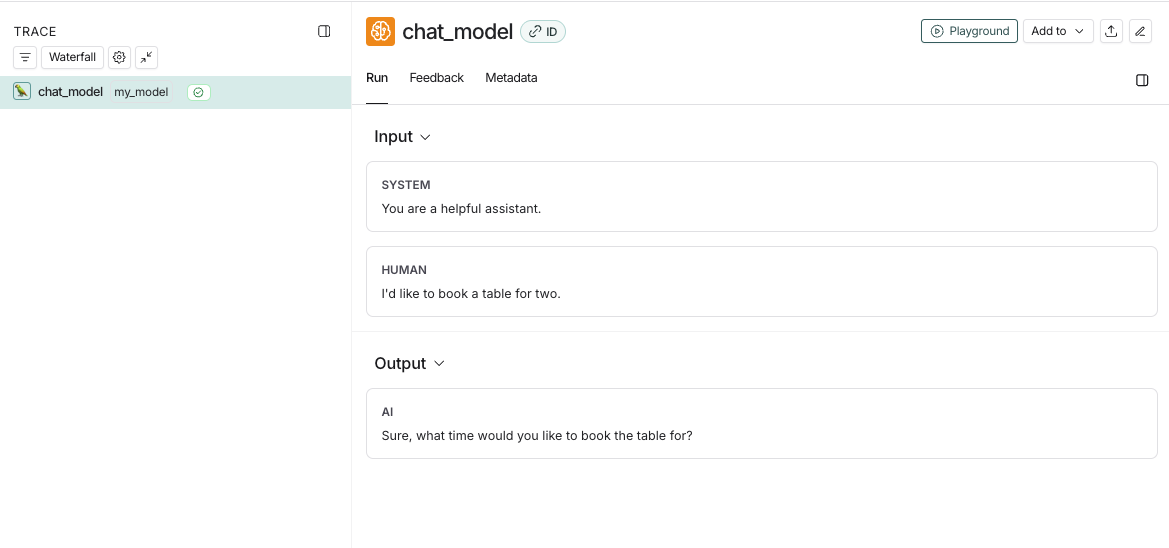
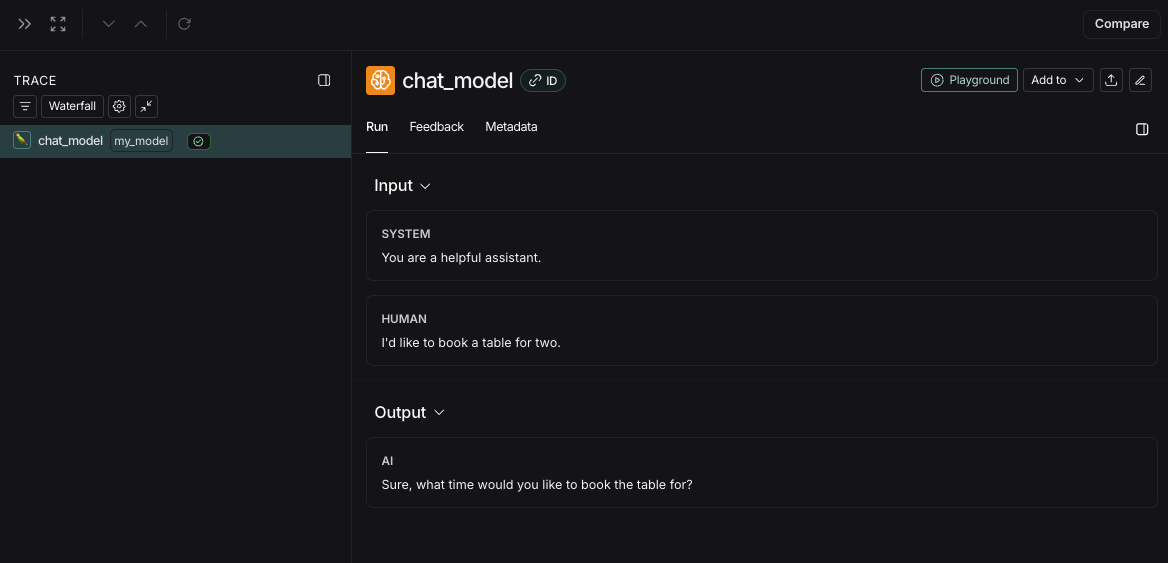
If you implement a custom streaming chat\_model, you can "reduce" the outputs into the same format as the non-streaming version. This is currently only supported in Python.
```python theme={null}
def _reduce_chunks(chunks: list):
all_text = "".join([chunk["choices"][0]["message"]["content"] for chunk in chunks])
return {"choices": [{"message": {"content": all_text, "role": "assistant"}}]}
@traceable(
run_type="llm",
reduce_fn=_reduce_chunks,
metadata={"ls_provider": "my_provider", "ls_model_name": "my_model"}
)
def my_streaming_chat_model(messages: list):
for chunk in ["Hello, " + messages[1]["content"]]:
yield {
"choices": [
{
"message": {
"content": chunk,
"role": "assistant",
}
}
]
}
list(
my_streaming_chat_model(
[
{"role": "system", "content": "You are a helpful assistant. Please greet the user."},
{"role": "user", "content": "polly the parrot"},
],
)
)
```
If `ls_model_name` is not present in `extra.metadata`, other fields might be used from the `extra.metadata` for estimating token counts. The following fields are used in the order of precedence:
1. `metadata.ls_model_name`
2. `inputs.model`
3. `inputs.model_name`
To learn more about how to use the `metadata` fields, refer to the [Add metadata and tags](/langsmith/add-metadata-tags) guide.
## Provide token and cost information
LangSmith calculates costs derived from token counts and model prices automatically. Learn about [how to provide tokens and/or costs in a run](/langsmith/cost-tracking#cost-tracking) and [viewing costs in the LangSmith UI](/langsmith/cost-tracking#viewing-costs-in-the-langsmith-ui).
## Time-to-first-token
If you are using `traceable` or one of our SDK wrappers, LangSmith will automatically populate time-to-first-token for streaming LLM runs.
However, if you are using the `RunTree` API directly, you will need to add a `new_token` event to the run tree in order to properly populate time-to-first-token.
Here's an example:
```python Python theme={null}
from langsmith.run_trees import RunTree
run_tree = RunTree(
name="CustomChatModel",
run_type="llm",
inputs={ ... }
)
run_tree.post()
llm_stream = ...
first_token = None
for token in llm_stream:
if first_token is None:
first_token = token
run_tree.add_event({
"name": "new_token"
})
run_tree.end(outputs={ ... })
run_tree.patch()
```
```typescript TypeScript theme={null}
import { RunTree } from "langsmith";
const runTree = new RunTree({
name: "CustomChatModel",
run_type: "llm",
inputs: { ... },
});
await runTree.postRun();
const llmStream = ...;
let firstToken;
for (const token of llmStream) {
if (firstToken == null) {
firstToken = token;
runTree.addEvent({ name: "new_token" });
}
}
await runTree.end({
outputs: { ... },
});
await runTree.patchRun();
```
***
[Edit this page on GitHub](https://github.com/langchain-ai/docs/edit/main/src/langsmith/log-llm-trace.mdx) or [file an issue](https://github.com/langchain-ai/docs/issues/new/choose).
[Connect these docs](/use-these-docs) to Claude, VSCode, and more via MCP for real-time answers.